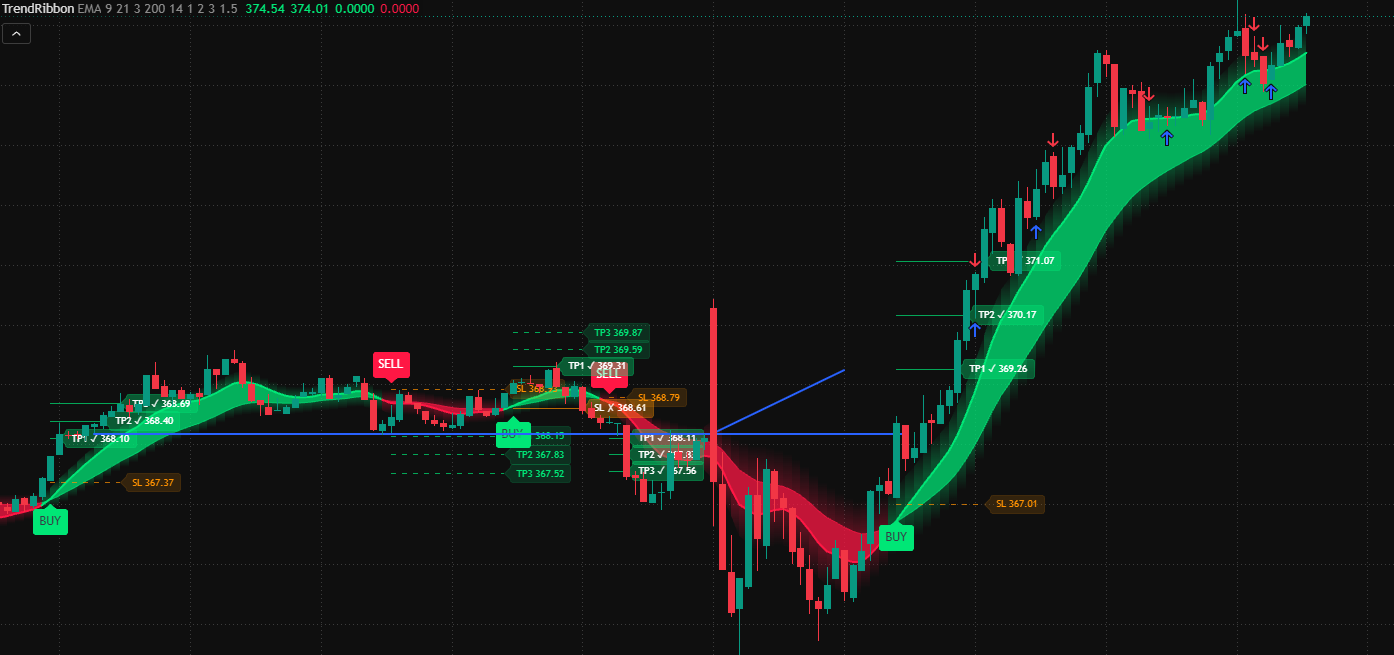
Trend Ribbon draws a glowing trend band on your chart, marks every BUY and SELL flip, and plots take-profit and stop-loss levels for each signal automatically.
No switching between tools. The ribbon, the signals and the trade levels are all part of one indicator.
Glowing trend ribbon
A band between a fast and a slow moving average that turns green in uptrends and red in downtrends, so the direction is clear at a glance.
BUY and SELL signals
A labelled marker appears every time the trend flips, right on the candle where it happened.
Automatic TP1, TP2, TP3
Three take-profit levels based on volatility (ATR) are drawn for every signal and get a check mark when price reaches them.
Stop-loss level
A stop-loss line is placed with each signal, so you always see where the idea is proven wrong.
Built-in alerts
Get notified in the TradingView app, by email or on your phone whenever a new BUY or SELL signal appears.
Fully adjustable
Choose EMA, SMA, WMA or HMA, tune the periods, turn on a long-term trend filter, change TP and SL distances and pick your own colors.
No repainting option
With "confirm on bar close" enabled, a signal is only printed once the candle has closed, so it does not appear and disappear while the bar is still forming.
All 10 included in the 10 Pack
10 scripts. One toolkit.
Trend Ribbon tells you the direction. The rest of the toolkit shows you the structure, the momentum and the key levels behind it, and the scanners find the stocks worth trading. Everything comes with built-in TradingView alerts.
Price action
Market Structure Pro
Read how the market is really moving: where the trend continues, where it starts to turn, and where price is likely to react.
Swing labels: HH, HL, LH and LL
Break of Structure (BOS) and Change of Character (CHoCH)
Order blocks that clear themselves once broken
Fair value gaps that disappear when filled
Oscillator
Momentum Wave
A momentum oscillator in its own pane that shows exhaustion, turning points and hidden weakness or strength.
Wave and signal lines with overbought and oversold zones
Buy and sell dots when momentum turns from an extreme
Money flow shading in the background
Automatic bullish and bearish divergences
Levels
Smart S/R Zones
Support and resistance zones found automatically from the places where price has turned again and again.
Zones ranked by how many times price reacted
Colored as support, resistance or currently testing
Breakout and breakdown signals with a volume filter
Updates as new swing points form
Market scanners
Stop flipping through charts one by one. The scanners score a whole list of stocks and show you which ones are worth a closer look.
Scanner
Short Scanner
Scans up to 35 US stocks at once and ranks the weakest ones as short candidates in a table on your chart.
Score from 0 to 100 for every stock
Trend, momentum, relative weakness vs. SPY and volume
Penalty for already oversold stocks to avoid chasing
Alert the moment a stock crosses your score threshold
Scanner
Long Scanner
The mirror image of the Short Scanner: finds the strongest stocks in your list as long candidates.
Score from 0 to 100 for every stock
Breakouts above 20-day highs and strong-volume up days
Relative strength vs. SPY
Penalty for overbought stocks
Screener
Short Score for Pine Screener
A version built for TradingView's Pine Screener, so you can scan whole watchlists and click straight into any chart.
Scan watchlists of up to 1,000 symbols
Sort results by score
Filter by "Strong short" or "Watch" conditions
Same scoring as the Short Scanner
Pro tools
Three more ways to time your entries: timeframe alignment, intraday value and liquidity grabs.
Dashboard
MTF Trend Dashboard
See the trend on five timeframes at once in a compact table, without switching charts.
Up, down or neutral status for each timeframe
Based on EMAs, RSI and MACD together
Overall verdict when all timeframes line up
Alert when every timeframe agrees
Intraday
VWAP Bands Pro
The volume-weighted average price with three deviation bands, the level many day traders and institutions watch.
Anchored to the session, week or month
Three adjustable standard-deviation bands
Reversion signals when price returns inside the bands
VWAP reclaim and loss markers
Price action
Liquidity Sweeps
Spots stop hunts: moments when price runs past a swing high or low, then snaps back.
Marks the swing highs and lows where stops cluster
Labels every sweep the moment it happens
Separates real sweeps from clean breakouts
Alerts for bullish and bearish sweeps
Up and running lightning fast
1
Buy access
Complete your purchase and tell us your TradingView username.
2
Add it to your chart
The indicator appears under Indicators › Invite-only scripts. One click adds it to any chart.
3
Set your alerts
Create a BUY, SELL or any-signal alert and let TradingView notify you.
One price. All 10 scripts.
One payment gets you every script in the toolkit.
Best value
10 Pack
99€one-time
All 10 scripts for a single one-time payment. No recurring payments.
Market Structure Pro, Momentum Wave and Smart S/R Zones
Short Scanner, Long Scanner and Pine Screener version
MTF Trend Dashboard, VWAP Bands Pro and Liquidity Sweeps
All future updates included
Secure checkout via Stripe. Access is granted to your TradingView username.
Questions
Which TradingView plan do I need?
The indicator works on every TradingView plan, including the free one. The number of alerts you can keep active depends on your own TradingView plan.
How do I receive the indicator?
After purchase, access is added to your TradingView username within [2-hours]. You will find it under Indicators › Invite-only scripts.
Does it repaint?
With "confirm on bar close" turned on (the default), a signal is fixed once the candle closes and will not move or disappear afterwards.
Which markets and timeframes does it work on?
Any symbol and timeframe on TradingView. Shorter timeframes produce more signals and more noise; 15-minute to daily charts usually give cleaner trends.
Can I get a refund?
We take refunds in only one scenario, if you didn't receive you're indicator.